Calendar & Reminders sync
Your real calendar, not a copy of it.
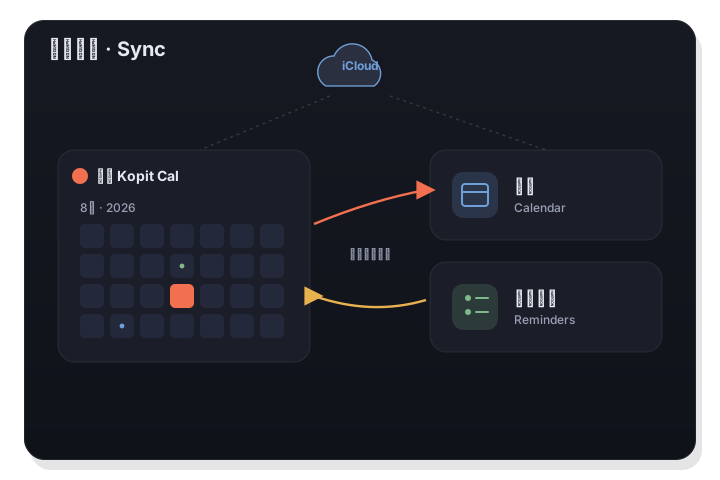
LiLi Cal works directly with the system Calendar and Reminders through Apple's EventKit. There's no third-party account and no separate database, so everything you add already syncs across your devices through iCloud.
Two-way: what you add here shows up in Calendar and Reminders, and vice versa.
How it works
- 1
Grant access once
On first use, macOS asks permission to access Calendar and Reminders. Grant it and LiLi Cal reads and writes your real data.
- 2
Work in the panel
Add events and tasks in LiLi Cal, or add them in Apple's apps — either way both sides stay in step, instantly.
- 3
Sync everywhere
Because your data lives in the system apps and your iCloud, it's already on your iPhone, iPad, and other Macs — no extra setup.
No new account, ever
LiLi Cal introduces no login and no third-party service. It's a native front-end to the calendars and lists you already have, which means your existing sharing and iCloud sync just work.
- Reads and writes via Apple's EventKit
- Multi-device sync through iCloud, for free
- No third-party account or data silo
Show only what matters
Choose exactly which system calendars appear in the panel — month dots, the agenda, and notifications all follow your choice. The Agenda tab lists every event for the next 60 days, grouped by date.
- Pick which calendars show in the panel
- 60-day agenda grouped by date
- Set the default calendar and list for new items
Good to know
- Framework
- Apple EventKit (Calendar + Reminders)
- Direction
- Two-way — reads and writes system data
- Account
- None — uses your existing calendars
- Multi-device
- Via iCloud, automatically
- Agenda
- Next 60 days, grouped by date
- Control
- Choose which calendars appear