Pomodoro
Focus, one tomato at a time.
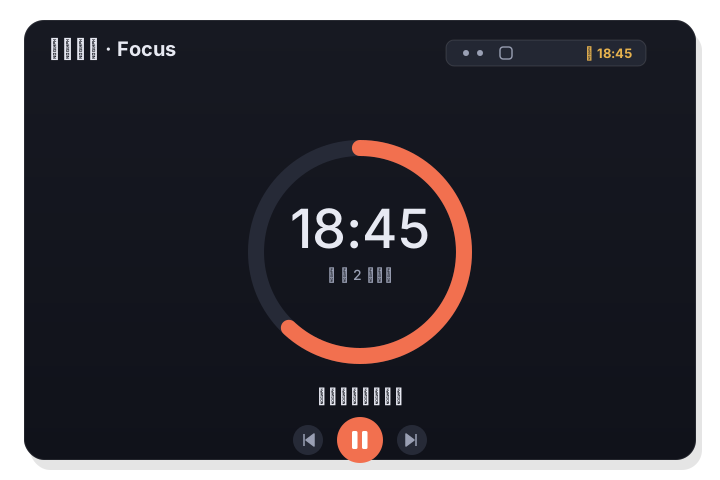
Turn a task into a Pomodoro and get to work. The countdown lives in the menu bar, breaks flow automatically, and when a session ends you can complete the task or roll straight into the next one.
Start focus from the Pomodoro tab or straight from any task.
How it works
- 1
Pick a task (optional)
Choose a task to focus on, or just start a plain Pomodoro. The focused task shows alongside the timer.
- 2
Start the timer
Begin the session and the countdown appears in the menu bar, so you can keep it in view while you work in other apps.
- 3
Break, then repeat
When the tomato finishes, LiLi Cal prompts a break and can start the next session — or complete the task if it's done.
The timer follows you
The countdown lives in the menu bar, not buried in a window, so a glance tells you how long is left. Start, pause, and resume from the panel or the menu-bar item.
- Live countdown in the menu bar
- Start / pause / resume anywhere
- Focused task shown with the timer
Work and breaks that flow
Finish a session and LiLi Cal nudges you into a break, then offers the next tomato — so the rhythm keeps going without fiddling. Complete the task right from the prompt when it's done.
- Automatic work / break cycling
- Gentle end-of-session prompts
- Complete the task from the finish prompt
Good to know
- Focus target
- Any task, or a plain session
- Timer
- Live countdown in the menu bar
- Controls
- Start / pause / resume
- Cycles
- Automatic work and break rotation
- On finish
- Break, next session, or complete the task
- Where
- Pomodoro tab or any task