Holiday subscriptions
Every region you care about, in one calendar.
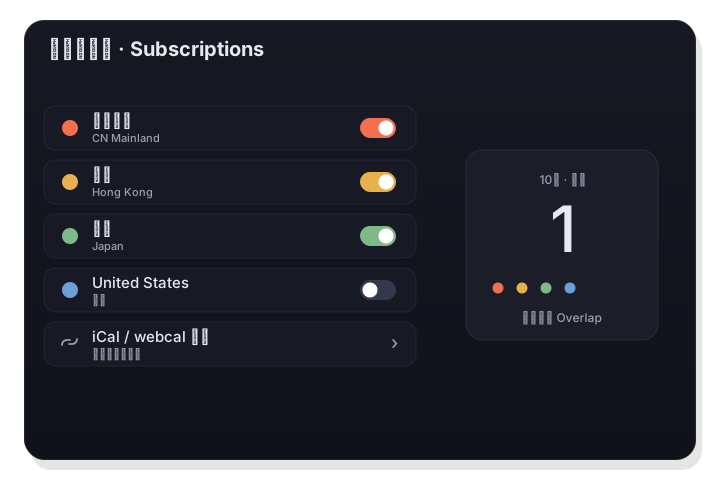
Beyond Mainland China and Hong Kong, follow any country or region. LiLi Cal pulls ~150 countries from the free Nager.Date service and accepts any iCal / webcal link, and it colors each source so overlapping calendars stay readable.
Nager.Date is free and needs no API key; iCal / webcal links follow RFC 5545.
How it works
- 1
Add a source
Open Settings › Holiday subscriptions and add a country or region, or paste any iCal / webcal URL — a Google calendar, a government feed, an office-holidays link.
- 2
Give it a color
Pick a color for each source. That color is used for its dots on the calendar, so you can tell regions apart at a glance.
- 3
Read the dots
Days with holidays in several regions show several colored dots, side by side — no more guessing whose holiday it is.
~150 countries, no key required
LiLi Cal uses the free Nager.Date public-holiday API, which covers roughly 150 countries and needs no account or API key. Add the regions your team, family, or clients live in and they're always current.
- Roughly 150 countries and regions
- Free service, no API key, no account
- Fetched over HTTPS to show dates only
Any iCal or webcal link
Have a calendar that isn't in the list? Paste its iCal / webcal URL. LiLi Cal parses RFC 5545 (including folded lines and escapes), so Google, government, and office-holidays feeds all work.
- RFC 5545 iCal / webcal parsing
- Works with Google, government, and company feeds
- Each subscription carries its own color
Good to know
- Countries
- ~150 via Nager.Date (free, no key)
- Custom feeds
- Any iCal / webcal link (RFC 5545)
- Colors
- A custom color per source
- Overlaps
- Multiple regions show side-by-side dots
- Storage
- Any number of sources by string source ID
- Privacy
- Feeds fetched over HTTPS; nothing about you attached