Product docs
Focus on a task with the Pomodoro timer
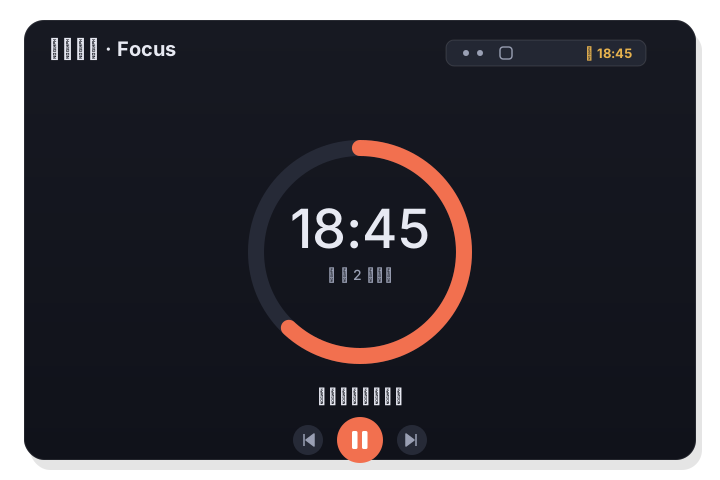
LiLi Cal includes a Pomodoro timer you can attach to a task. The countdown runs live in the menu bar, work and break intervals cycle automatically, and the task can be completed when the session ends.
À retenir
- Start a Pomodoro focused on a specific task.
- The countdown shows live in the menu bar while you work.
- Work and break intervals cycle automatically, and the task completes at the end.
Focus a task
The Pomodoro timer is tied to your tasks, so instead of a generic timer you pick the task you want to work on and start focusing. This keeps the session anchored to something concrete rather than just counting down minutes.
- Choose a task and start a focus session.
- The timer is anchored to that specific task.
- Keeps your attention on one thing at a time.
Live countdown in the menu bar
While a Pomodoro is running, the countdown appears live in the menu bar. You can see the remaining time without opening the panel, so the timer stays visible while you work in other apps.
- Remaining time shown in the menu bar.
- No need to keep the panel open.
- Visible while you work in other apps.
Automatic cycles and completion
Work and break intervals cycle automatically, so you do not have to restart the timer between rounds. When the focus session ends, you can complete the task, closing the loop between focusing and marking work done.
- Work and break intervals alternate automatically.
- No manual restart between rounds.
- Complete the task when the session ends.
Questions fréquentes
Can I run a Pomodoro without picking a task?
The Pomodoro is designed around focusing a task, so you choose the task you want to work on and can complete it when the session ends.
Where do I see the timer while I work?
The countdown runs live in the menu bar, so you can keep track of the remaining time without opening the LiLi Cal panel.