Product docs
Two-way sync with Calendar and Reminders via EventKit
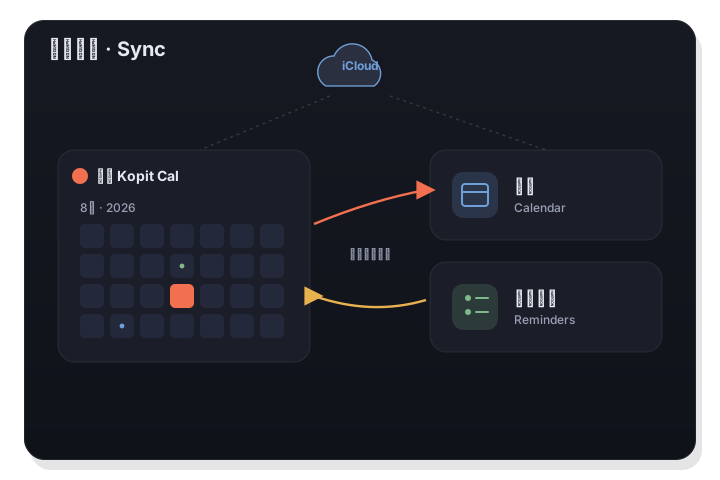
LiLi Cal reads and writes your events and tasks through Apple EventKit, so it stays in two-way sync with the system Calendar and Reminders. There is no third-party account; syncing across devices uses iCloud, and you choose which calendars appear.
핵심 요약
- Two-way sync with the system Calendar and Reminders via Apple EventKit.
- No third-party account; multi-device sync happens through iCloud.
- Pick which calendars appear, and view a 60-day agenda grouped by date.
How the sync works
LiLi Cal does not store your events in its own database. It uses Apple EventKit to read and write directly to the system Calendar and Reminders, so anything you add in LiLi Cal appears in Apple Calendar or Reminders, and anything you add there shows up in LiLi Cal. The sync is two-way and immediate.
- Uses Apple EventKit for direct read and write.
- Changes flow both ways between LiLi Cal and the system apps.
- No separate database or export step.
No account, iCloud across devices
Because LiLi Cal relies on the system apps, there is no LiLi Cal account to create. If your Calendar and Reminders already sync across your Mac, iPhone, and iPad through iCloud, LiLi Cal simply reflects that. Your data continues to live in Apple's apps and your iCloud.
- No LiLi Cal sign-up required.
- Multi-device sync rides on your existing iCloud setup.
- Data stays in Apple Calendar, Reminders, and iCloud.
Calendar picker and 60-day agenda
You choose which of your calendars appear in LiLi Cal, so you can hide the ones you do not want to see. The agenda gives you a rolling 60-day view of upcoming events grouped by date, making it easy to scan what is coming without paging month by month.
- Show or hide individual calendars.
- 60-day agenda of upcoming events.
- Agenda is grouped by date for quick scanning.
자주 묻는 질문
Do I need a LiLi Cal account to sync?
No. LiLi Cal uses Apple EventKit to work with your system Calendar and Reminders, and multi-device sync happens through your existing iCloud, so there is no separate account.
Will my events show up in Apple Calendar too?
Yes. The sync is two-way, so events you add in LiLi Cal appear in Apple Calendar, and events added elsewhere appear in LiLi Cal.