Guide
Choosing a lunar-calendar app for Mac
A good lunar-calendar app should show the lunar date every day, place the 24 solar terms correctly, and work offline. This guide explains what to check and how LiLi Cal handles it.
ポイント
- Look for lunar dates shown on every day, not buried in a separate view.
- Accurate solar terms matter; check that they land on the right days.
- Offline computation means the lunar calendar works without a network.
Lunar dates you can always see
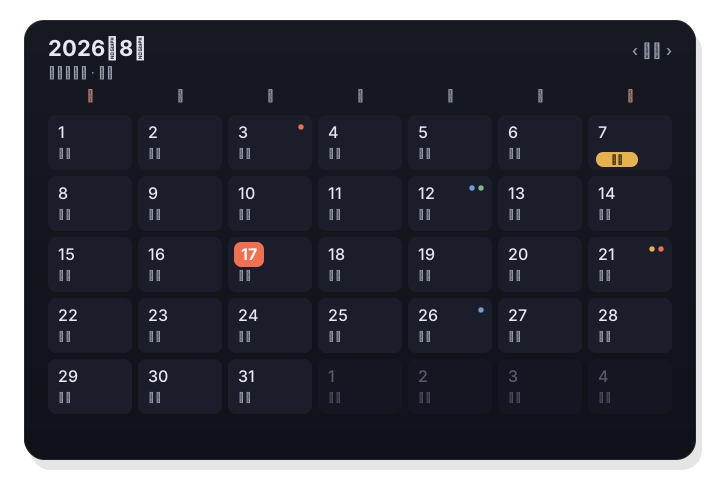
The most useful lunar-calendar apps put the lunar date right on the month view so you never have to dig for it. Check that the lunar day sits under each Gregorian date rather than in a separate panel. LiLi Cal shows the lunar date under every day in its scrolling month view.
- Lunar date visible under each day.
- No separate view required.
- Works alongside your normal events.
Accurate solar terms and festivals
The 24 solar terms and traditional festivals are where accuracy really shows. A good app places each term on the correct day rather than approximating. LiLi Cal computes solar terms with the Shouxing formula and labels festivals like 春节 and 中秋 on their days.
- All 24 solar terms placed correctly.
- Traditional festivals labeled clearly.
- Solar terms use the Shouxing formula.
Offline and integrated
A lunar calendar should not depend on a server, and it is far more useful if it sits next to your real schedule. Prefer an app that computes lunar data locally and syncs with your system calendar. LiLi Cal computes everything offline and syncs events through EventKit, so the lunar calendar and your schedule live together.
- Lunar data computed on-device, offline.
- Syncs your events via Apple EventKit.
- Cultural dates and your schedule in one view.
よくある質問
Does a lunar-calendar app need to be online?
It should not. LiLi Cal computes lunar dates, solar terms, and festivals on-device, so they work without any network connection.
Can I see my own events next to the lunar calendar?
Yes with LiLi Cal. It syncs your system Calendar and Reminders through EventKit, so your events appear on the same month view as the lunar dates.